Lagos Life Game Needs: How to Eat, Wash and Rest at Home
At home, tap the cooler for food, the water drum for Wash Face and the mattress for rest. Read the effect labels before picking an action: Fetch Water improves Fitness, while Wash Face improves Hygiene. If furniture blocks the route, clear space in Buy mode. This guide pictures those controls.
On this page
How do you find food, hygiene and rest actions?
The objects in your home open action menus. The Cooler Box has food, the Water Drum & Jerrycans has a hygiene action and the Foam Mattress has rest choices. The effect label beneath each action tells you which bar it affects. For the full needs list and their relative decay order, read the beginner guide.
Source and review: these pictures come from Can I Get Rich in Lagos Life Without Begging? by Katherine Psych, published 2026-10-06. We read the full transcript and checked each frame on 2026-10-14. The recording shows food and wash menus, a failed walk and an active rest action; it does not show every action completing. These screenshots document an older recording, not our own live-account test. Captions link to the exact source seconds.
If you are away from home, the map and travel walkthrough shows how to return before using these objects.
Step 1 — Where is food in the starter room?
Tap the blue-and-white Cooler Box. Its panel says it keeps garri, sugar and zobo without needing light. Soak Garri & Sugar carries a Hunger effect; Drink Zobo carries Hunger and Fun. Use those labels to choose what your Sim needs. The recording opens this menu but waits to eat, so this frame is not a completed meal.
The same panel lists what is In your kitchen and shows Order groceries on Chowdeck. It does not demonstrate that order flow, so this guide does not claim how delivery works. For a stove example, see the home walkthrough’s cooking step.
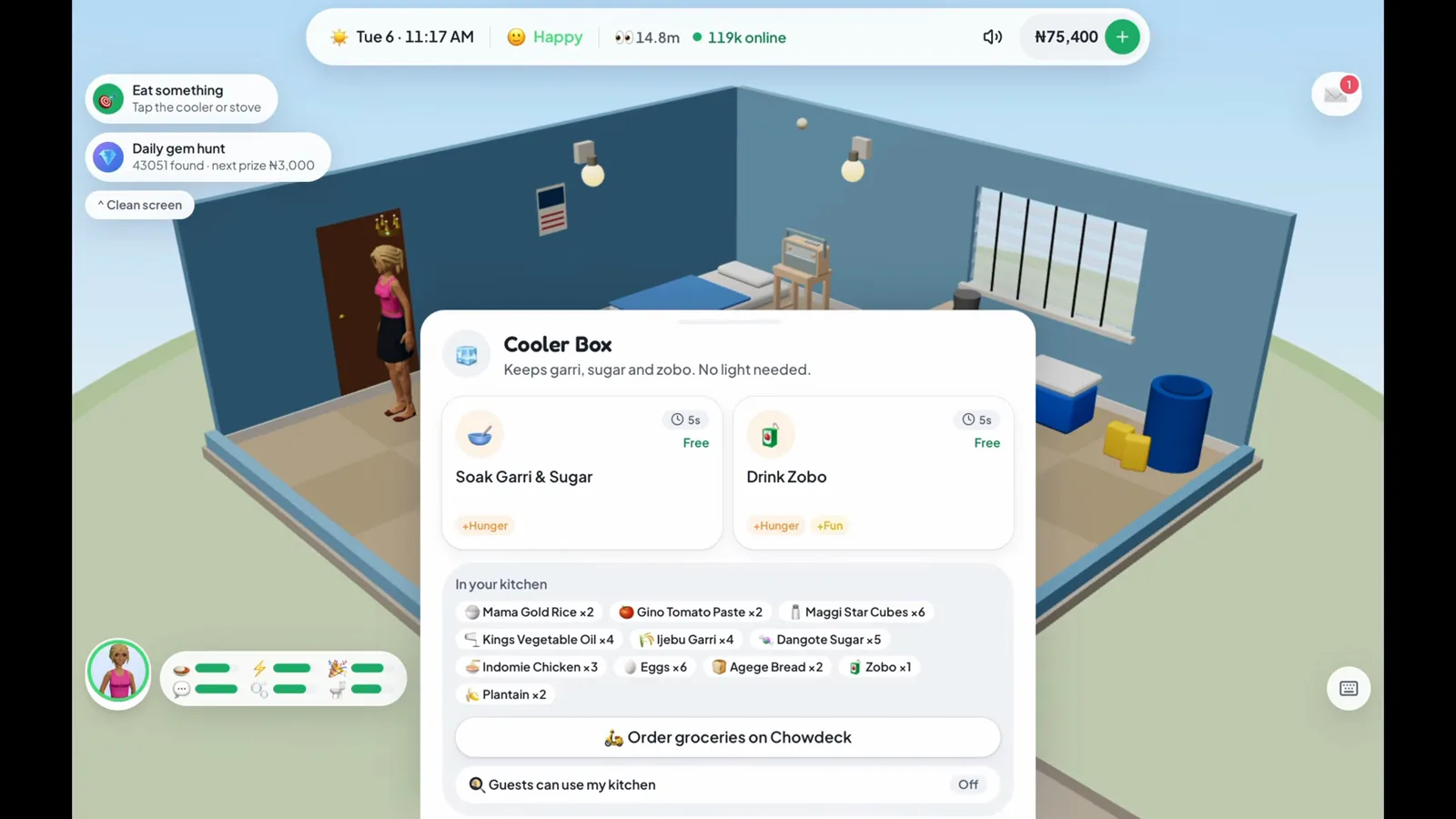
The food menu names the action and the need it helps. (6:17 in the video)
Step 2 — Which water action improves hygiene?
Tap the blue drum and yellow containers to open Water Drum & Jerrycans. Choose Wash Face when the hygiene bar needs attention. Its effect is Hygiene. The neighbouring Fetch Water action is labelled Fitness, so it serves a different purpose even though it is on the same object.
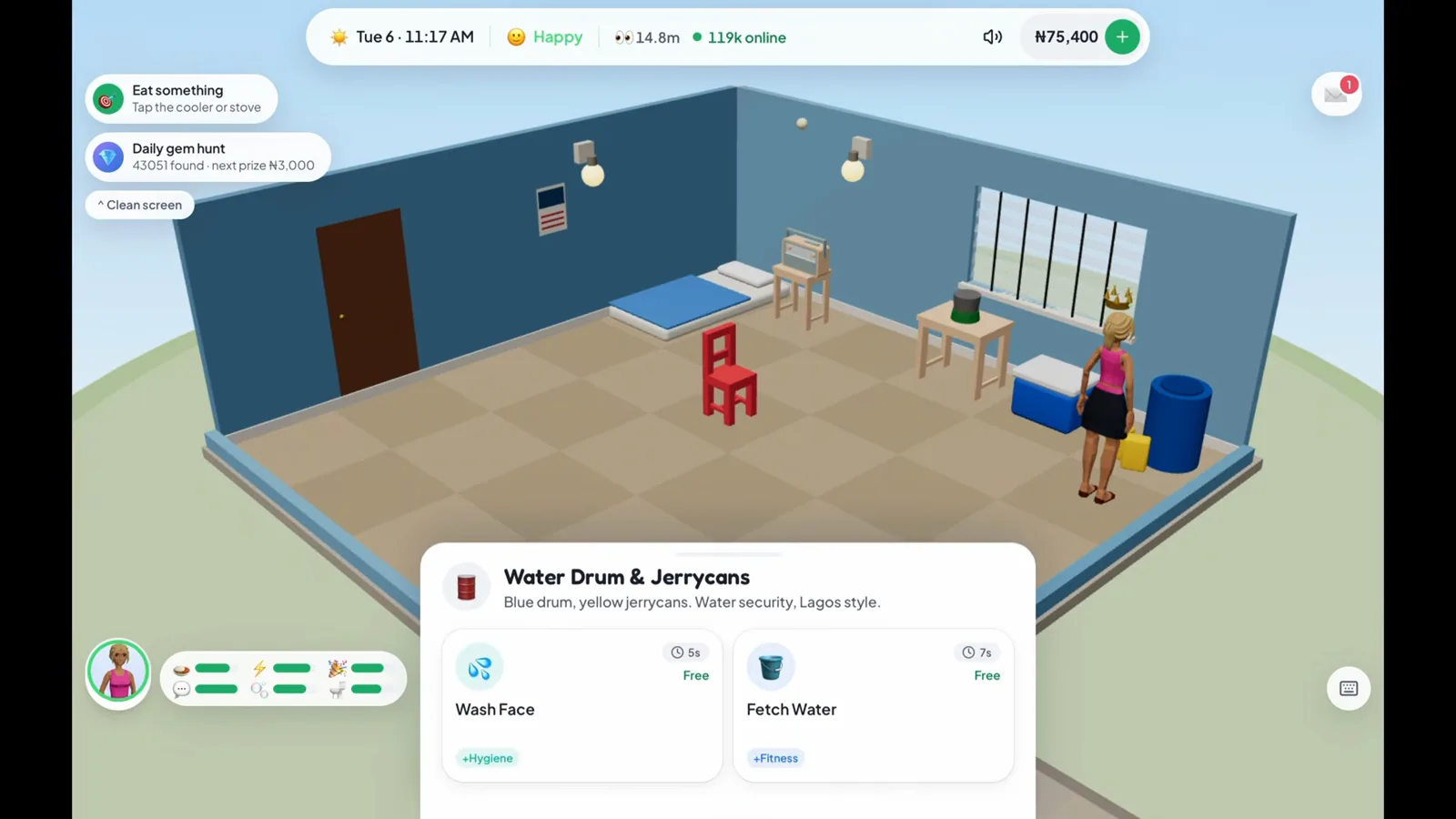
Read the effect label: washing and fetching water do different things. (6:34 in the video)
Step 3 — What if furniture blocks the action?
This attempt runs into Can’t reach walk here: furniture is in the way. The toast explicitly says to move things around in Buy mode. Opening a menu alone does not mean an action has completed: your Sim also needs access to the object.
Leave room around the object before trying again. Our furniture rearrangement walkthrough pictures the move controls. This excerpt does not show the blocked route being repaired or a successful wash afterward.
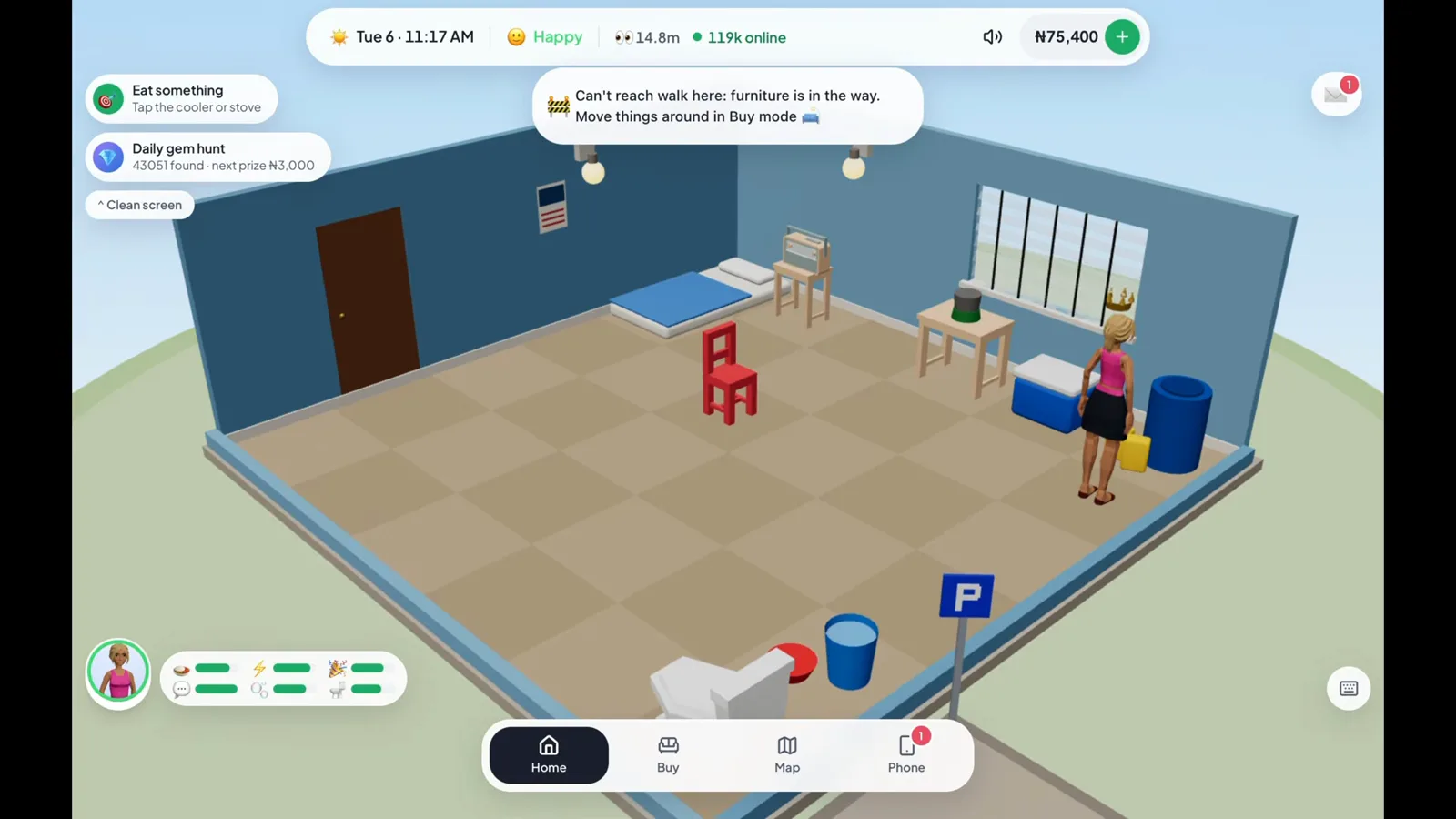
A path warning is a failed attempt, not a completed wash. (6:37 in the video)
Step 4 — Where are the sleep and rest choices?
Tap the Foam Mattress on the floor. The menu offers Sleep, Take a Nap and Stay in Bed. All carry an Energy label in this recording; Stay in Bed also carries Fun. Read the current card’s duration and effects before you choose, especially if a work shift is about to start.
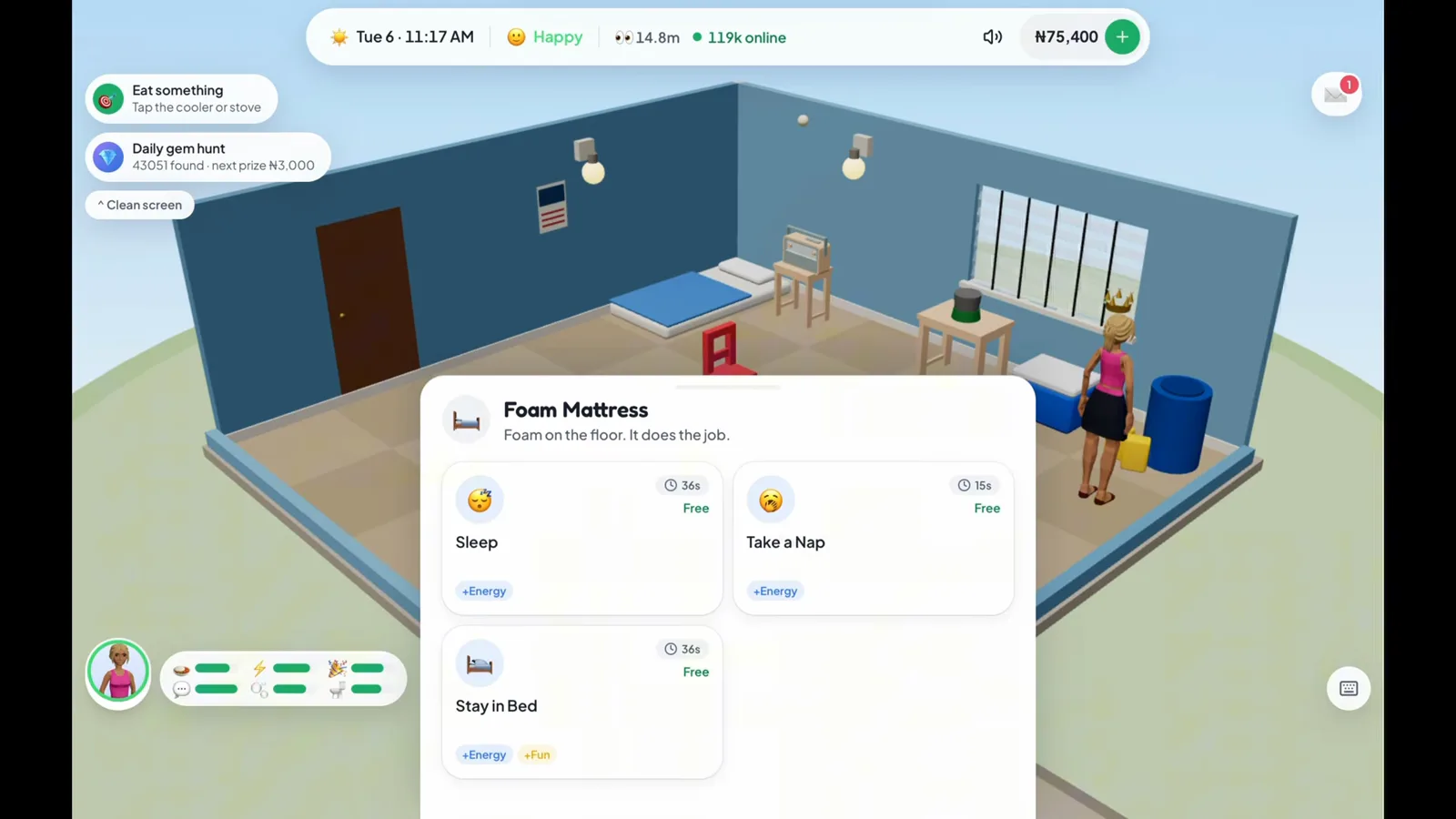
The mattress has several choices, with the effects printed underneath. (6:44 in the video)
Step 5 — How do you tell that resting has started?
The player chooses Stay in Bed. The Sim lies on the mattress, the active action appears at the top-left and Wake up appears at the bottom-right. The active card also says tap to cancel. These are the controls to look for when you want to interrupt the rest action.
This frame establishes that the action started, rather than measuring how much energy it restored. Check your own needs bars when it finishes; this guide does not infer a recovery rate from a short clip.
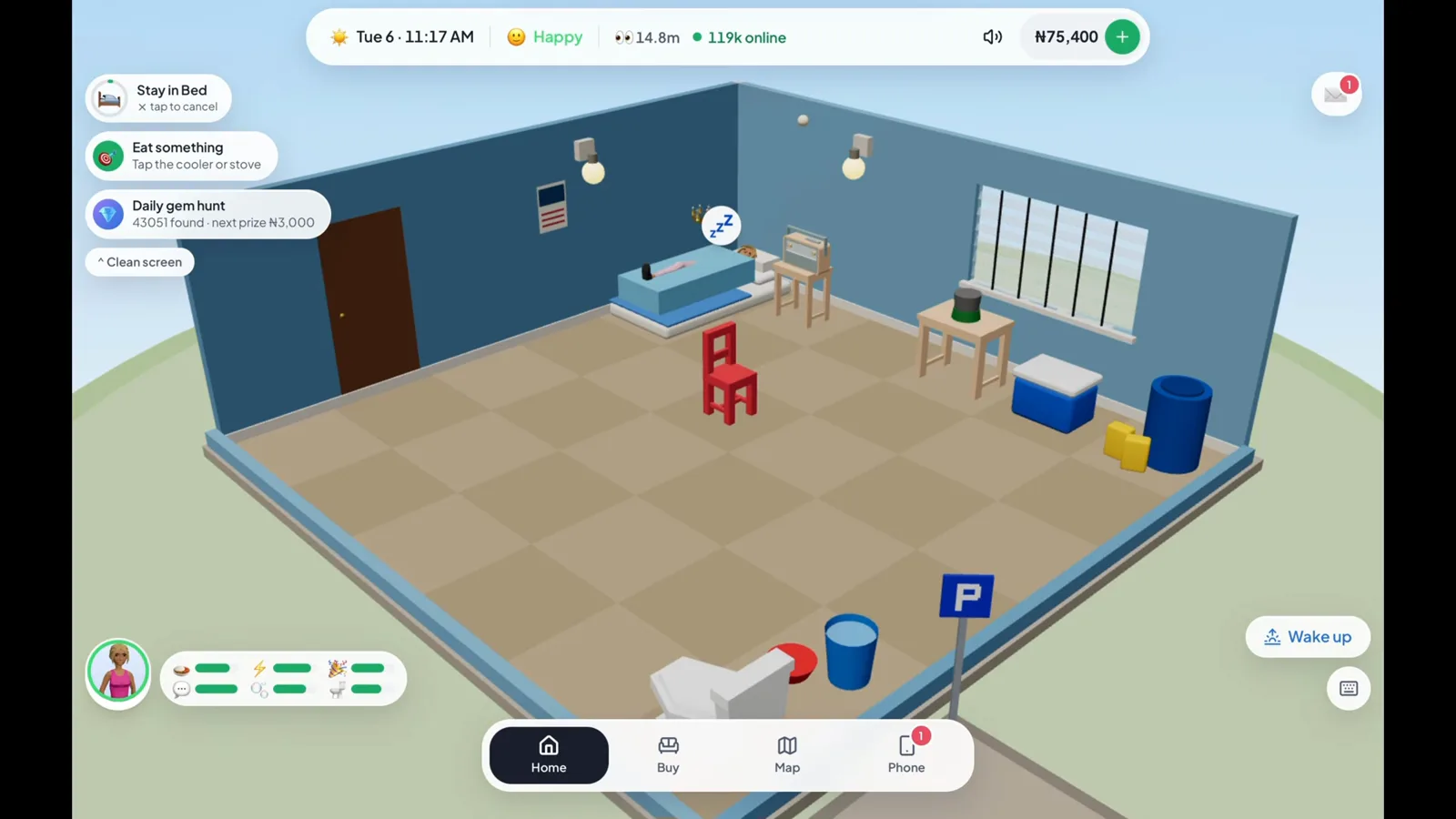
The active card and Wake up button show that the rest action is running. (6:49 in the video)
What should you check before leaving home?
Look at the needs widget again and address the bars that are low. Food, hygiene and rest cover the actions shown here; this excerpt does not demonstrate bladder or social actions. The first-day walkthrough explains where the full Needs panel lives, and transport fares helps you budget the next trip.
Frequently asked questions
How do you eat at home in Lagos Life Game?
Tap the Cooler Box. In the recording its menu offers Soak Garri & Sugar and Drink Zobo, both labelled with a Hunger effect. The panel also lists kitchen stock and an Order groceries on Chowdeck button. This excerpt shows the menu, rather than a completed food order.
How do you improve hygiene in a starter room?
Select the Water Drum & Jerrycans and use Wash Face, which carries a Hygiene label in the recording. Fetch Water on the same panel is labelled Fitness, so opening the right object is only part of the choice.
Why does Lagos Life say furniture is in the way?
The recording shows a Can't reach walk here warning and tells the player to move things around in Buy mode. Clear a route to the object before trying again. This excerpt does not demonstrate a successful fix, so the pictured warning is not proof that the wash action completed.
How do you stop resting in Lagos Life?
The recording selects Stay in Bed and then shows a Wake up button beside the room. The active action also says tap to cancel. The mattress menu separately lists Sleep and Take a Nap, with their own effect labels.
Related pages
Lagos Life Game Map Guide: How to Travel and Go Home
Use the Lagos Life Game map in six pictured steps: find a destination, compare transport, tap Go, arrive at a venue and choose a ride back to your home.
Lagos Life Game Furniture: How to Move and Rotate It
Rearrange furniture in Lagos Life Game with five clear pictures: select an owned chair, use Move, rotate, confirm Done and spot a blocked stove warning.
Lagos Life Game UNILAG Guide: Student Start, Halls and Exams
Choose the UNILAG student start in Lagos Life Game, budget for hall rent, enrol later, unlock exams and see what your degree changes after graduation.
Was this helpful?